
The Canvas is one week. Each card is a piece and each column is a day. Move between weeks with the arrows, zoom in and out, and switch between board view and day view - on a phone, day view is easier.
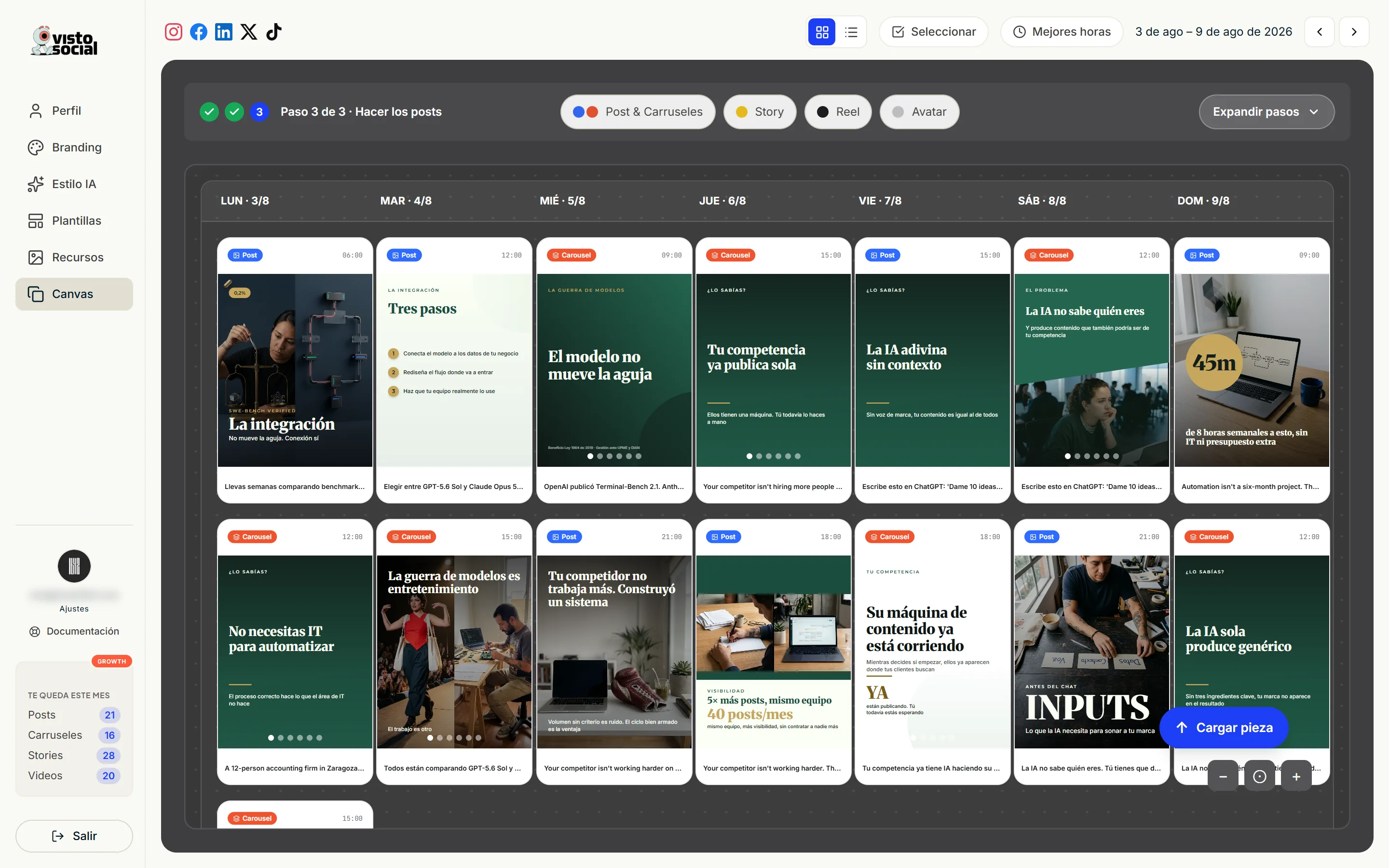
The week's three steps
- 1Search trends. Visto checks your niche and your sources and proposes ideas in a chat. You approve the ones that fit and ask for changes on the ones that don't. The week is built from four.
- 2Research in depth. Each approved idea becomes a brief: thesis, audience pain, angles, sources and answered questions. You can open and read it.
- 3Make the posts. Once the ideas are researched, the generation buttons unlock.
What you can generate
- Posts and carousels - both at once, or only posts, or only carousels.
- Stories - vertical, and you edit them frame by frame.
- Reel - video with clips, voice over and captions.
- Avatar - a person talking to camera.
- Avatar Pro - a multi-shot reel with the same character.
- One-off - a single piece from your own topic or from your catalog, choosing the design.
- Upload - you upload something you already made and schedule it.
Top right always shows what's left of your month. When a button is off, hover it: the message says why.
Best times
If Instagram or Facebook are connected, Visto imports your history and works out which hours perform best for you. Those are the hours it proposes when scheduling.